
Что такое агент пользователя?
Этот термин относится к любому программному обеспечению, которое облегчает взаимодействие конечного пользователя с веб-контентом. Строка агента пользователя (АП) - это текст, который программа клиентского компьютера отправляет в запросе.
Строка агента пользователя помогает целевому серверу определить, какой браузер, тип устройства и операционная система используются. Например, строка сообщает серверу, что на вашем компьютере используется браузер Chrome и операционная система Windows 10. Сервер может использовать эту информацию для настройки ответа в соответствии с типом устройства, ОС и браузера.
Большинство браузеров отправляют заголовок агента пользователя в следующем формате, хотя в выборе агентов пользователя нет особой последовательности:

Каждый браузер добавляет свои компоненты комментариев, такие как платформа или RV (release version). Mozilla предлагает примеры строк, которые должны использоваться для парсеров:

Ниже приведены примеры с сайта разработчиков Chrome того, как выглядит формат строки UA для различных устройств и браузеров:
Chrome для Android
Телефонный UA:

Mozilla/5.0 (Linux; ; )AppleWebKit/ (KHTML, like Gecko) Chrome/Mobile Safari/
Планшетный UA:

Почему необходимо использовать агент пользователя?
При проведении веб-парсинга иногда можно обнаружить, что веб-сервер блокирует определенные агенты пользователя. В основном это связано с тем, что он идентифицирует источник как бота, а некоторые сайты не допускают ботов-парсеров. Более сложные сайты делают это наоборот, т.е. разрешают агентам пользователей, которые, по их мнению, являются допустимыми, выполнять задания на парсинг. Действительно сложные сайты проверяют, действительно ли поведение браузера соответствует заявленному пользовательскому агенту.
Вы можете подумать, что правильным решением будет не указывать в запросах агент пользователя. Однако это заставляет инструменты использовать UA по умолчанию. Во многих случаях целевой веб-сервер заносит его в черный список и блокирует.
Как же сделать так, чтобы ваш пользовательский агент не был заблокирован?
Советы, как избежать запрета UA при парсинге
#1: Используйте реальный пользовательский агент
Если ваш пользовательский агент не принадлежит одному из основных браузеров, некоторые сайты будут блокировать его запросы. Многие веб-парсеры, основанные на ботах, пропускают этап определения UA, что приводит к тому, что они могут быть обнаружены и забанены за отсутствие неправильного UA по умолчанию.
Избежать этой проблемы можно, задав широко используемый UA для своего веб-парсера. Большой список популярных агентов пользователя можно найти здесь. Вы можете составить список популярных строк и чередовать их, выполняя cURL-запрос к веб-сайту. Тем не менее, мы рекомендуем использовать пользовательский агент вашего браузера, поскольку поведение браузера с большей вероятностью будет соответствовать ожидаемому от пользовательского агента, если вы не будете слишком сильно его менять.
#2: Чередуйте пользовательские агенты
При выполнении многочисленных запросов в процессе веб-парсинга их следует чередовать. Это позволит свести к минимуму вероятность того, что веб-сервер определит и заблокирует ваши UA.
Как можно рандомизировать запросы?
Одним из решений является смена IP-адреса запроса с помощью вращающихся прокси-серверов. Таким образом, каждый раз отправляется разный набор заголовков. На стороне веб-сервера это будет выглядеть так, как будто запрос поступает с разных компьютеров и из разных браузеров.
Совет: Агент пользователя - это заголовок, но заголовки включают в себя гораздо больше, чем просто агенты пользователя. Нельзя просто отправлять случайные заголовки, необходимо убедиться, что отправляемый пользовательский агент соответствует отправляемым заголовкам.
Вы можете использовать botcheck.luminatio.io, чтобы проверить, соответствуют ли отправляемые вами заголовки тому, что ожидается от пользовательского агента.

Как выполнить ротацию агентов пользователя
Прежде всего, необходимо собрать список строк агентов пользователя. Мы рекомендуем использовать строки из реальных браузеров, которые можно найти здесь. Следующий шаг - добавление этих строк в список Python. И, наконец, определить, что каждый запрос выбирает случайную строку из списка.
Пример ротации пользовательских агентов с помощью Python 3 и Selenium 4 можно посмотреть в этом обсуждении на stack overflow. Пример кода выглядит следующим образом:
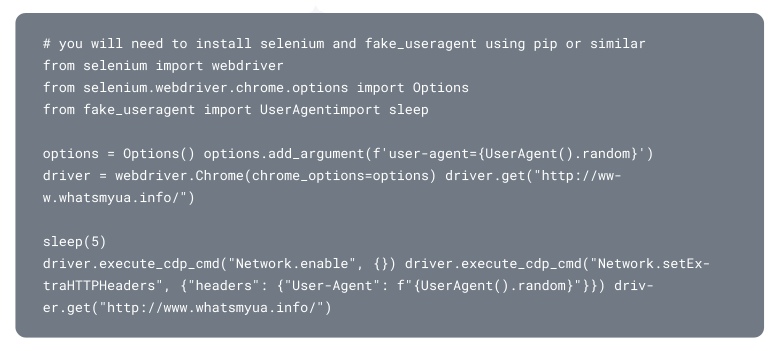
Какую бы программу или метод вы ни выбрали для ротации UA-заголовков, во избежание обнаружения и блокировки следует придерживаться одних и тех же приемов:
- #1: Чередовать полный набор заголовков, связанных с каждым UA.
- #2: Отправлять заголовки в том порядке, в котором их обычно отправляет реальный браузер
- #3: Используйте предыдущую страницу, которую вы посетили, в качестве "заголовка реферера".
Совет: при использовании заголовка referrer необходимо убедиться, что IP-адрес и cookies не меняются. В идеале нужно действительно посетить предыдущую страницу, чтобы на целевом сервере была запись о ней.
#3: Чередуйте агенты использования с помощью прокси-сервера
Вы можете избежать головной боли и хлопот, связанных с ручным определением списков и ротацией IP-адресов, используя ротационную сеть прокси-серверов. Прокси-серверы позволяют настроить автоматическую ротацию IP-адресов и строк UA. Это означает, что ваши запросы выглядят так, как будто они поступают из различных браузеров. Это значительно снижает количество блокировок и увеличивает процент успешных запросов, так как создается впечатление, что запросы поступают от реальных пользователей. Следует помнить, что только специальные прокси-серверы, использующие технологию Data Unlocking, способны