
Веб-парсинг стал одним из наиболее мощных методов сбора данных из Интернета в сообществе специалистов по науке о данных. Часто мы полагаемся на чужие наборы данных, но важно вооружиться необходимыми навыками для создания собственных наборов данных. Именно поэтому компании из списка Fortune 500, такие как Amazon, CNN, Target и Walmart, используют веб-парсинг для того, чтобы продвигаться вперед и не отставать в работе с данными. Это незаменимый инструмент роста и один из их самых сокровенных секретов, и он легко может стать вашим.
В этой статье вы узнаете, как с помощью языка Python осуществлять поиск данных. В конце статьи вы поймете наиболее важные компоненты веб-парсинга, что даст вам навыки для создания собственного веб-парсера.
Если вы специалист по изучению данных или инженер машинного обучения, желающий создать новые наборы данных, или веб-разработчик, заинтересованный в автоматизации задач, то в этой статье вы найдете подробное описание основ и подходов к веб-парсингу, которые вы сможете легко применить в реальном мире бизнеса или в своих личных проектах.
Что такое веб-парсинг?
Веб-парсинг, также называемый извлечением данных из Интернета, представляет собой автоматизированный процесс сбора общедоступных веб-данных с целевых сайтов. Вместо того чтобы собирать данные вручную, можно использовать программное обеспечение для автоматического сбора большого количества информации, что значительно ускоряет процесс.
Почему веб-парсинг важен?
Некоторые веб-сайты могут содержать очень большой объем бесценных данных, таких как цены на акции, информация о товарах, спортивная статистика и т.д. Если вы хотите получить доступ к этой информации, вам придется либо использовать формат, используемый на сайте, либо копировать и вставлять информацию вручную в новый документ. Это может быть довольно утомительно, если требуется извлечь много информации с сайта, и здесь на помощь может прийти веб-парсинг. Вместо того чтобы собирать данные вручную, в большинстве случаев предпочтительнее использовать программные средства, называемые веб-парсерами, поскольку они менее затратны по сравнению с человеческим трудом и работают быстрее. Веб-парсеры могут работать на вашем компьютере или в центре обработки данных.
Как работает веб-парсинг?
Процесс веб-парсинга включает три основных этапа:
- Шаг 1: Получение содержимого с веб-сайта. Вы получаете содержимое целевого веб-сайта с помощью программного обеспечения для веб-парсинга, называемого также веб-парсером, который выполняет HTTP-запросы к определенным URL-адресам. В зависимости от ваших целей, опыта и бюджета вы можете либо купить услугу веб-парсинга, либо создать свой собственный веб-парсер. Веб-парсеру выдается один или несколько URL-адресов для поиска. Затем парсер загружает весь HTML-код запрашиваемых страниц. Более продвинутые парсеры отображают всю веб-страницу, включая элементы CSS и JS.
- Шаг 2: Извлечение необходимых данных. Необходимая информация из HTML-кода анализируется веб-парсером в соответствии с вашими требованиями.
- Шаг 3: Сохранение разобранных данных. Последним шагом является сохранение разобранных данных. Как правило, данные сохраняются в форматах CSV или JSON для дальнейшего использования.
Примеры использования веб-парсинга
Предприятия используют веб-парсинг для различных целей, таких как маркетинговые исследования, защита бренда, мониторинг цен, SEO-мониторинг, агрегирование тарифов, мониторинг отзывов и т.д. Давайте рассмотрим некоторые из них более подробно:
- Билетные боты - Веб-парсеры все чаще используются для выполнения задач, связанных с продажей билетов, таких как поиск информации о ценах, проверка инвентаря на наличие новых мест и покупка билетов. Например, билетные брокеры, по всей видимости, использовали билетных ботов на Ticketmaster для покупки большинства билетов на тур альбома Тейлор Свифт "Midnight".
- Мониторинг конкурентных цен - Поскольку компаниям необходимо следить за постоянно меняющимися ценами на рынке, сбор информации о ценах на товары с таких сайтов, как Amazon или eBay, крайне важен для выработки точной стратегии ценообразования. Например, с помощью веб-парсинга можно экспортировать список наименований товаров и цен с сайта Amazon в электронную таблицу Excel и провести анализ конкурентов.
- Исследование рынка - веб-парсинг широко используется для исследования рынка. Чтобы оставаться конкурентоспособными, компаниям необходимо знать свой рынок и анализировать данные о конкурентах.
- SEO-мониторинг - веб-парсинг позволяет компаниям проводить SEO-аудит для отслеживания результатов и продвижения в рейтинге поисковых систем.
- Мониторинг отзывов - веб-парсинг также может использоваться для отслеживания отзывов клиентов и достижения маркетинговых целей.
- Генерация ссылок - парсинг данных из LinkedIn, Yellow Pages или YELP для генерации ссылок.
- Агрегирование туристических тарифов - туристические компании используют веб-парсеры для поиска предложений на нескольких сайтах и публикации агрегированных результатов на своих сайтах.
- Парсинг цен на акции - для принятия лучших инвестиционных решений.
- Парсинг спортивной статистики - для ставок или фэнтези-лиг.

Инструменты для веб-парсинга
Теперь, когда вы знаете основы веб-парсинга, вы, вероятно, задаетесь вопросом, какой же веб-парсер лучше всего подходит для вас? Очевидный ответ заключается в том, что все зависит от ситуации! Понять, какой веб-парсер лучше всего подходит для вас, гораздо проще, чем больше вы знаете о своих потребностях в веб-парсинге. В настоящее время веб-сайты могут иметь различные формы и форматы, и, как следствие, веб-парсеры могут отличаться по функциональности и возможностям. Например, веб-парсеры могут быть в виде расширения для браузера или более мощного настольного приложения, которое можно загрузить на компьютер для локального сканирования сайтов с использованием ресурсов компьютера и подключения к Интернету или развернуть в "облаке".
Таким образом, как видите, на рынке представлен целый ряд автоматизированных веб-пасреров. Среди наиболее распространенных инструментов для парсинга можно назвать Octoparse и ParseHub. Эти приложения позволяют автоматизировать извлечение данных из различных источников в Интернете при условии, что вы знаете, какой тип контента вам нужен.
Законен ли веб-парсинг?
С ростом популярности веб-парсинга появляется все больше вопросов о его законности. Несмотря на то, что сам по себе веб-парсинг не является противозаконным, и нет четких законов или правил, регулирующих его применение, важно соблюдать все другие законы и правила, касающиеся источников и самих данных. В целом, согласно решению апелляционного суда США, соскабливание общедоступных данных, т.е. данных, которые можно увидеть, не заходя на сайт, является законным при условии, что ваша деятельность по соскабливанию не наносит ущерба работе сайта, с которого производится соскабливание.
Приведем несколько примеров того, что веб-парсинг может быть незаконным, которые вам следует рассмотреть:
- Парсинг интеллектуальной собственности - Вы должны быть уверены, что не нарушаете законы, применимые к данным, защищенным авторским правом, таким как дизайн, статьи, видео и все то, что можно считать творческой работой. Парсирование данных, защищенных авторским правом, в личных целях обычно не представляет опасности, поскольку может подпадать под положение о добросовестном использовании в законодательстве об интеллектуальной собственности. Однако распространение данных, на которые вы не имеете прав, является незаконным.
- Сбор персональных данных - Важно не собирать персональную информацию (PII), поскольку большинству людей не нравится, когда их личная информация собирается без их ведома или согласия. Поэтому после парсирование перепроверьте полученные результаты на предмет наличия данных, противоречащих GDPR или CCPA.
- Парсирование конфиденциальных данных - Соскабливание частного контента без разрешения также может привести к неприятностям.
Как создать веб-парсер на языке Python?
Чувствуете себя авантюристом? Точно так же, как каждый может создать веб-сайт, вы можете создать свой собственный веб-парсер, если захотите, конечно, немного поработав с кодом. В следующем разделе мы расскажем о том, как создать простой бот для парсинга с помощью Python. В Python имеется множество библиотек, включая requests, beautifulsoup, selenium, scrapy и pandas, которые позволяют легко разрабатывать программы для парсинга.
Вы напишете веб-парсер на Python, который загружает набор данных IMDB Top 250 по фильмам (название фильма, первоначальный релиз, имя режиссера и звезды). IMDb, или Internet Movie Database, - это онлайновая база данных, содержащая информацию о фильмах, телепрограммах, домашнем видео, видеоиграх и потоковом контенте. Она включает такие данные, как актерский состав, съемочная группа, биографии, краткое описание сюжета, мелочи, рейтинги и критические отзывы.
Но сначала необходимо установить несколько библиотек Python:
- requests: Первым шагом в любом рабочем процессе веб-парсинга является отправка HTTP-запроса на веб-сервер для отображения данных на целевой странице. Requests - это библиотека Python, которая призвана упростить процесс отправки HTTP-запросов к заданному URL. Когда вы делаете запрос к URI, он возвращает ответ.
- html5lib: Библиотека Python для разбора HTML. Она разработана в соответствии со спецификацией WHATWG HTML, реализованной во всех основных веб-браузерах.
- bs4: BeautifulSoup - это фреймворк для веб-парсинга на языке Python, позволяющий удобно анализировать HTML. Так как BeautifulSoup может только анализировать данные и не может получать сами веб-страницы, его часто используют вместе с библиотекой requests. Таким образом, когда библиотека requests посылает HTTP-запрос к веб-странице, после его успешной отправки и возврата BeautifulSoup может быть использован для разбора данных
- pandas: Библиотека, построенная на базе библиотеки NumPy, которая предоставляет различные структуры данных и операторы для манипулирования числовыми данными.
- lxml: библиотека Python для обработки/разбора XML и HTML.

Шаги создания
Шаги по реализации веб-парсинга в python для извлечения фильмов IMDb и их рейтингов:
Шаг 1. Установите необходимые библиотеки Python
$ pip install requests beautifulsoup4 html5lib pandas lxml
Шаг 2: Импорт необходимых библиотек
Откройте текстовый редактор и вставьте следующий код:
from bs4 import BeautifulSoup
import requests
import re
import pandas as pd
Шаг 3: Доступ к HTML-содержимому с веб-страницы
Получить доступ к HTML-содержимому с веб-страницы можно, присвоив ей URL и создав объект soap следующим образом:
# Загрузка данных о 250 лучших фильмах по версии imdb с веб-страницы
url = 'http://www.imdb.com/chart/top'
response = requests.get(url)soup = BeautifulSoup(response.text, "html.parser")
Шаг 4: Извлечение информации о фильме
В приведенном ниже фрагменте кода мы извлекаем данные из объекта BeautifulSoup, используя такие Html-теги, как title, href и т.д.
movies = soup.select('td.titleColumn')
crew = [a.attrs.get('title') for a in soup.select('td.titleColumn a')]
рейтинг = [b.attrs.get('data-value')
for b in soup.select('td.posterColumn span[name=ir]')]
Шаг 5: Сохранение информации о фильме
После извлечения информации о фильме необходимо создать пустой список, сохранить информацию в словаре и добавить ее в список.
# создаем пустой список для хранения
# деталей фильмаlist = []
# Итерация над фильмами для извлечения
# метаданные каждого фильмаfor index in range(0, len(movies)):
# Разделение фильмов на: 'place',
# 'название', 'год'
movie_string = movies[index].get_text()
movie = (' '.join(movie_string.split()).replace('.', ''))
movie_title = movie[len(str(index))+1:-7]
год = re.search('\((.*?)\)', movie_string).group(1)
place = movie[:len(str(index))-(len(movie))]
data = {"place": place,
"movie_title": movie_title,
"рейтинг": ratings[index],
"year": year,
"star_cast": crew[index],
}
list.append(data)
Шаг 6: Отображение подробностей фильма
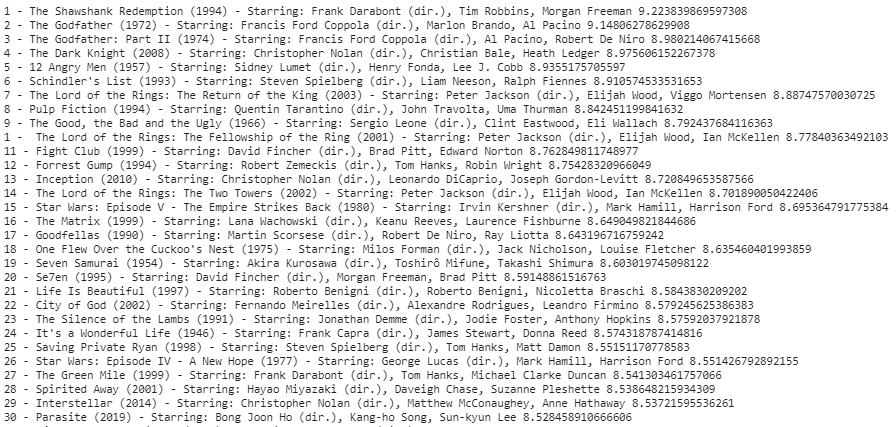
Теперь, когда наш список заполнен лучшими фильмами IMDB и их метаданными, пришло время отобразить подробности.
for movie in list:
print(movie['place'], '-', movie['movie_title'], '('+movie['year'] +
') -', 'В главных ролях:', movie['star_cast'], movie['rating'])
Шаг 7: Сохранить данные в CSV-файле
Следующие строки кода сохранят данные в .csv-файл.
#сохранение списка как фрейма данных
#преобразование в файл .csvdf = pd.DataFrame(list)
df.to_csv('imdb_top_250_movies.csv',index=False)
Полный код:
from bs4 import BeautifulSoup
import requests
import re
import pandas as pd
# Downloading imdb top 250 movie's dataurl = 'http://www.imdb.com/chart/top'
response = requests.get(url)
soup = BeautifulSoup(response.text, "html.parser")
movies = soup.select('td.titleColumn')
crew = [a.attrs.get('title') for a in soup.select('td.titleColumn a')]
ratings = [b.attrs.get('data-value')
for b in soup.select('td.posterColumn span[name=ir]')]
# create a empty list for storing
# movie informationlist = []
# Iterating over movies to extract
# each movie's detailsfor index in range(0, len(movies)):
# Separating movie into: 'place',
# 'title', 'year'
movie_string = movies[index].get_text()
movie = (' '.join(movie_string.split()).replace('.', ''))
movie_title = movie[len(str(index))+1:-7]
year = re.search('\((.*?)\)', movie_string).group(1)
place = movie[:len(str(index))-(len(movie))]
data = {"place": place,
"movie_title": movie_title,
"rating": ratings[index],
"year": year,
"star_cast": crew[index],
}
list.append(data)
# printing movie details with its rating.for movie in list:
print(movie['place'], '-', movie['movie_title'], '('+movie['year'] +
') -', 'Starring:', movie['star_cast'], movie['rating'])
##.......##df = pd.DataFrame(list)
df.to_csv('imdb_top_250_movies.csv',index=False)
Выполните этот код в терминале или IDE. Сохраняется csv-файл с данными, представленными на следующем изображении:
Заключение
Подводя итог, можно сказать, что веб-парсинг - это автоматизированный процесс сбора данных. Компании могут использовать его в различных целях, например, для получения лидов, поиска данных о конкурентах, анализа фондового рынка и т.д. Веб-парсинг является легальным видом деятельности, если он не нарушает законов, касающихся исходных объектов или самих данных. Однако прежде чем приступать к какой-либо деятельности, связанной с веб-парсингом, необходимо получить профессиональную юридическую консультацию по конкретной ситуации. Также необходимо учитывать все возможные риски, связанные с небрежным отношением к веб-парсингу, например, блокировку. Вот, собственно, и все, что касается веб-парсинга. Однако в этой области еще много интересного, и я предлагаю вам ознакомиться с некоторыми наиболее распространенными методами парсинга и отточить свои навыки программирования на Python!
См. также: Парсинг сайтов и маркетплейсов, Как спроектировать решение для веб-парсинга: Пошаговое руководство, Разработка ПО.