
Что такое cURL?
cURL - это инструмент командной строки, который можно использовать для передачи данных по сетевым протоколам. Название cURL расшифровывается как "Client URL", а также как "curl". Эта популярная команда использует синтаксис URL для передачи данных на серверы и с серверов. Curl работает на основе 'libcurl', бесплатной и простой в использовании библиотеки передачи URL на стороне клиента.
Почему использование curl выгодно?
Универсальность этой команды позволяет использовать curl для различных целей, включая:
- Аутентификация пользователей
- HTTP-посты
- SSL-соединения
- Поддержка прокси-серверов
- FTP-загрузки
Самым простым "сценарием" использования curl является загрузка и выгрузка целых сайтов с помощью одного из поддерживаемых протоколов.
Протоколы curl
Хотя curl имеет длинный список поддерживаемых протоколов, по умолчанию он будет использовать HTTP, если вы не укажете конкретный протокол. Вот список поддерживаемых протоколов:
Команда cURL - список поддерживаемых протоколов - dict, file, ftp, ftps, gopher, http, https, imap, imaps, ldap, pop3, stmp, rtsp, scp, sftp, smb, sms, telnet, tftp
Установка curl
Команда curl устанавливается по умолчанию в дистрибутивах Linux.
Как проверить, установлена ли у вас команда curl?
- Откройте консоль Linux
- Введите 'curl' и нажмите 'enter'.
- Если у вас уже установлен curl, то вы увидите следующее сообщение:

4. Если curl еще не установлен, то появится следующее сообщение: 'command not found'. Тогда вы можете обратиться к своему дистрибутиву и установить его (подробнее об этом ниже).
Как использовать cURL
Синтаксис Curl довольно прост:

Например, если вы хотите загрузить веб-страницу: webpage.com, просто выполните команду:

Команда выдаст исходный код страницы в окне терминала. Следует помнить, что если вы не укажете протокол, то по умолчанию curl будет использовать HTTP. Ниже приведен пример определения конкретных протоколов:

Если вы забудете добавить ://, то curl сам догадается, какой протокол вы хотите использовать.
Мы вкратце рассказали о базовом использовании команды, но список опций можно найти на сайте документации по curl. Опции - это возможные действия, которые вы можете выполнить над URL. Когда вы выбираете опцию, она указывает curl, какое действие следует выполнить с указанным URL. URL указывает cURL, где он должен выполнить это действие. Затем cURL позволяет перечислить один или несколько URL.

Чтобы загрузить несколько URL, добавьте к каждому URL префикс -0, за которым следует пробел. Это можно сделать в одной строке или написать для каждого URL отдельную строку. Можно также загрузить часть URL, перечислив страницы. Например:

Сохранение загрузки
С помощью curl можно сохранить содержимое URL в файл, используя два различных метода:
1. Метод -o: Позволяет добавить имя файла, в который будет сохранен URL. Эта опция имеет следующую структуру:

2. -O method: Здесь не нужно добавлять имя файла, так как данная опция позволяет сохранить файл под именем URL. Чтобы использовать эту опцию, достаточно поставить перед URL-адресом префикс -O.
Возобновление загрузки
Может случиться так, что загрузка остановится на середине. В этом случае перепишите команду, добавив в начало опцию -C :

Почему curl так популярен?
Curl - это действительно "ножницы" команд, созданные для выполнения сложных операций. Однако существуют альтернативы, например, 'wget' или 'Kurly', которые подходят для более простых задач.
Curl - фаворит среди разработчиков, поскольку он доступен практически для всех платформ. Иногда он даже устанавливается по умолчанию. Это означает, что какие бы программы/рабочие места вы ни запускали, команды curl должны работать.
Кроме того, есть шанс, что если вашей ОС меньше десяти лет, то curl уже установлен. Вы также можете прочитать документацию в браузере и проверить документацию по curl. Если вы используете последнюю версию Windows, то, скорее всего, у вас уже установлен curl. В противном случае ознакомьтесь с этой статьей на Stack Overflow, чтобы узнать больше о том, как это сделать.
Использование cURL с прокси-серверами
Некоторые пользователи предпочитают использовать cURL совместно с прокси-сервером. К преимуществам можно отнести:
Увеличение возможности успешного управления запросами данных из различных геолокаций.
Экспоненциальное увеличение числа одновременно выполняемых заданий с данными.
Для этого можно воспользоваться встроенными в cURL возможностями '-x' и '(- - proxy)'.
Полезно знать: cUrl совместим с большинством распространенных типов прокси, включая HTTP, HTTPS и SOCKS.
Как изменить User-Agent
User-Agent - это характеристики, позволяющие целевым сайтам идентифицировать устройство, запрашивающее информацию. Целевой сайт может потребовать от запрашивающих определенные критерии для возврата нужных данных. Это может касаться типа устройства, операционной системы или используемого браузера. В этом случае организации, собирающие данные, стремятся подражать идеальному "кандидату" на целевой сайт.
Для примера предположим, что сайт, на который вы ориентируетесь, "предпочитает" использовать в качестве браузера Chrome. Для того чтобы получить нужный набор данных с помощью cURL, необходимо эмулировать эту "особенность браузера" следующим образом:
curl -A "Goggle/9.0 (X11; Linux x86_64; rv:60.0) Gecko/20100101 Chrome/103.0.5060.71" https://getfedora.org/.
Парсинг с помощью cURL
Совет: обязательно соблюдайте правила сайта, и вообще не пытайтесь получить доступ к защищенному паролем содержимому, которое в большинстве случаев является незаконным или, по крайней мере, не одобряется.
С помощью curl можно автоматизировать повторяющийся процесс веб-парсинга, что поможет избежать утомительных задач. Для этого необходимо использовать PHP. Вот пример, найденный нами на GitHub:
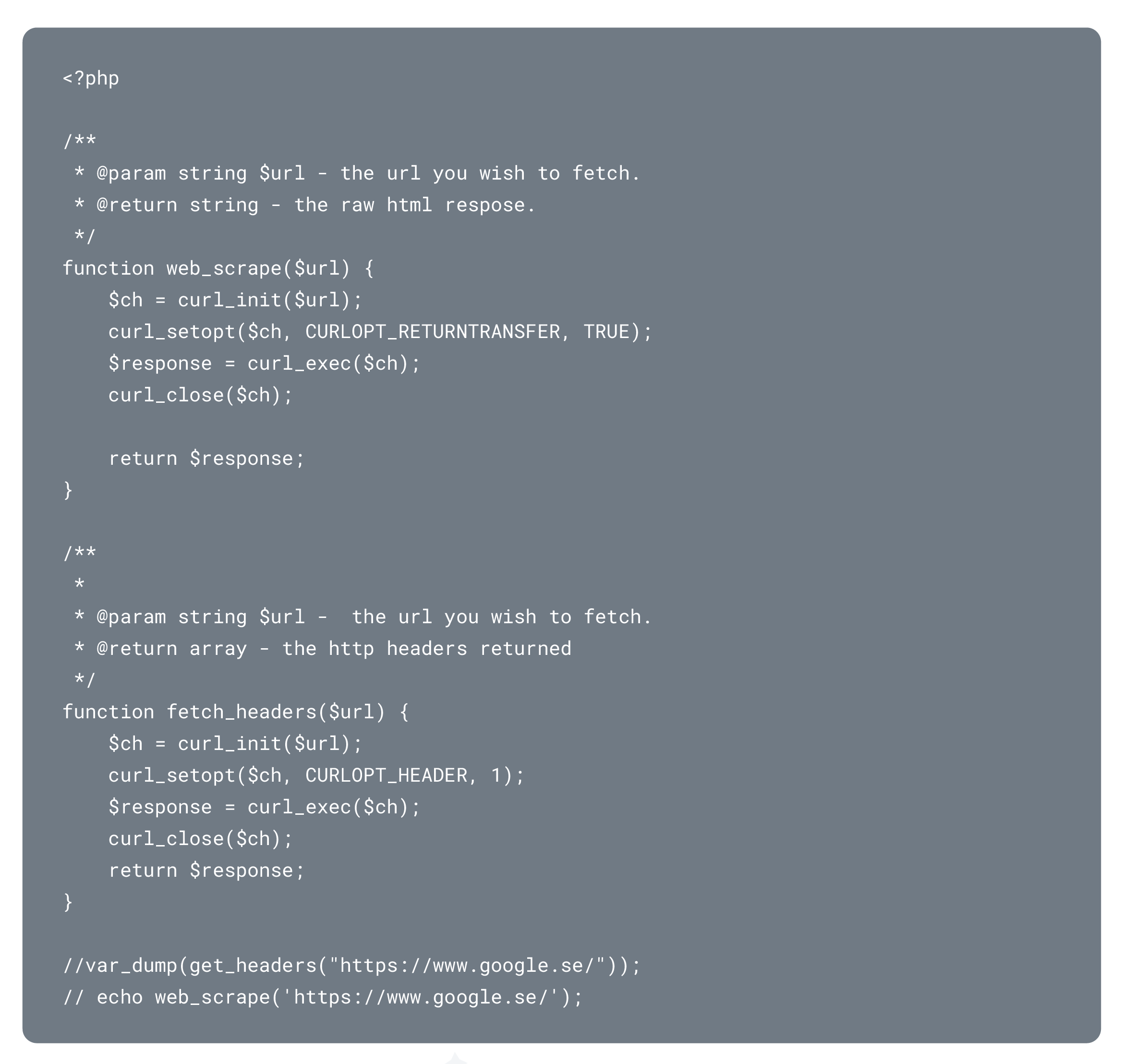
Когда вы используете curl для сканирования веб-страницы, вы должны использовать три опции:
- curl_init($url) -> Инициализирует сессию
- curl_exec() -> Выполняет
- curl_close() -> Закрытие

Другие опции, которые следует использовать, включают:
curlopt_url -> Задает URL, по которому будет производиться поиск

Curlopt_returntransfer -> Указывает curl сохранять соскобленную страницу как переменную. (Это позволяет получить именно то, что вы хотели извлечь из страницы).

Итог
Несмотря на то что cURL является мощным инструментом веб-парсинга, он требует от компаний затрат драгоценного времени разработчиков как на сбор данных, так и на их очистку.
См. также: Парсинг сайтов и маркетплейсов, Как спроектировать решение для веб-парсинга: Пошаговое руководство, Разработка ПО.