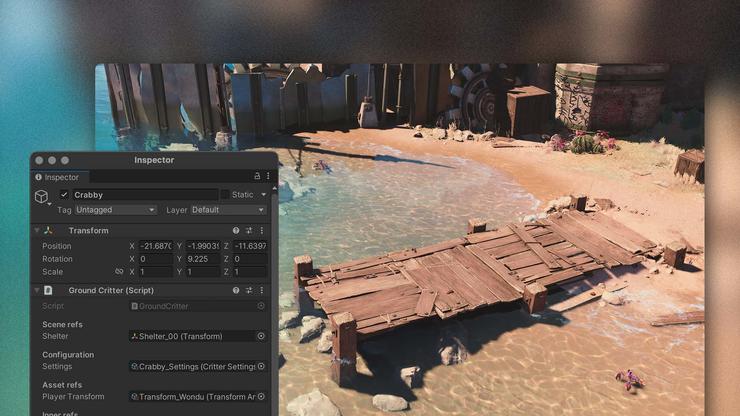
Разработка игры сопряжена с множеством препятствий, и ни одно из них не является более серьезным, чем выбор игрового движка для разработки. Разработка игр на Unity предоставляет вам арсенал инструментов и активов для быстрого и качественного создания игры, но есть и множество преимуществ, которые дает использование Unity для разработки игр, о которых мы подробно расскажем в этой статье, чтобы дать вам лучшее представление о платформе.
Тысячи студий используют Unity для разработки игр, но почему? Ответ прост - это не только количество и качество предоставляемых ресурсов, но и сама платформа, которая легко интегрируется с другим программным обеспечением и обеспечивает высокий уровень доступности для разработчиков любого уровня подготовки и опыта. Давайте разберемся подробнее, почему вам стоит обратить внимание на разработку игр на Unity.
Unity - обзор
Unity обеспечивает высокий стандарт создания игр, способных создавать AAA-визуальные эффекты, качественный звук и, по сути, плавный геймплей. Имея обширный список инструментов для разработки как в 2D, так и в 3D, разработка игр Unity предоставляет вам, как разработчику, следующие преимущества Unity, но не только:
- Простые рабочие процессы, предоставляющие разработчикам инструменты для создания сцен и настройки редактора под себя Встроенная динамическая система анимации, способная создавать пользовательские и естественные анимации за относительно короткие сроки по сравнению с другими пакетами.
- Простая многоплатформенная поддержка, позволяющая развернуть игру на всех платформах, что означает, что разработка мобильных игр с помощью Unity - проще простого
- Огромный выбор готовых активов на рынке, что означает, что независимо от того, занимаетесь ли вы разработкой мобильных игр с помощью Unity или просто разработкой 3D-игр Unity для ПК, вы сможете найти активы, необходимые для запуска вашей игры, и заполнить любые пробелы в квалификации вашей производственной команды.
- Unity невероятно удобна в использовании, ее интерфейс настраивается, что означает, что даже на начальном уровне вы сможете легко ориентироваться в ее инструментах и механиках, а те, кто более знаком с разработкой игр на Unity, смогут настроить ее под свои конкретные процессы разработки.
Плюсы разработки игр на Unity
Бесконечная совместимость
Разработка игр Unity дает вам преимущество программирования на C# в качестве основного языка, и преимущество этого языка заключается в том, что он является относительно низким начальным уровнем и довольно прост для понимания даже начинающим программистом. Кривая обучения на таком языке относительно плавная по сравнению с другими языками, а это значит, что вы будете регулярно получать стимул учиться и совершенствоваться дальше. Разработка игр на Unity ведется с учетом совместимости не только с другим программным обеспечением и средами исполнения, но и с людьми.

Увидеть, чтобы поверить
Разработка игр Unity 3D, в частности, невероятно надежна в своей способности помочь даже программистам низкого уровня достичь высоких результатов. Внедрение Visual Scripting позволяет пользователям создавать сценарии без написания кода в сети, основанной на узлах. Вы можете создавать исходы, связывающие узлы, и хотя это не обеспечивает такой же уровень настройки и производительности, как стандартное кодирование, это позволяет вам развивать свои навыки и лучше понимать конвейер.
Все, как вы захотите
Не только агентство по разработке 3D-игр на Unity может извлечь выгоду из использования этой платформы для производства, Unity также способна создавать 2D-игры. На самом деле, это наиболее используемый инструмент разработки для 2D-игр для мобильных платформ, поскольку он обеспечивает надежную возможность портирования на другие игровые магазины и платформы.
Unity в движении
Кроссплатформенные возможности Unity делают его идеальным для создания игр для мобильных устройств и Android, поскольку он позволяет легко публиковать контент. Гибкость движка - это, безусловно, одно из преимуществ Unity, которое принесло ему нынешнюю популярность.
Потрясающие визуальные эффекты
Unity предлагает энергичное решение для рендеринга, особенно благодаря более современному подходу к SRP. Он обеспечивает модульность и кастомизацию, что в целом приводит к повышению производительности. Настройка цикла рендеринга осуществляется с помощью скрипта C# и предоставляет два варианта реализации. URP и HDRP.
URP предназначен для высокой производительности, что позволяет игре работать на любом устройстве, и, как правило, именно его использует большинство современных игр. Другой вариант - HDRP - нацелен именно на высокопроизводительные устройства. Он обеспечивает широкие визуальные возможности, которые, откровенно говоря, поражают воображение и быстро становятся востребованными в индустрии.
Стоит отметить, что пользовательские конвейеры рендеринга в Unity абсолютно возможны, а значит, в зависимости от вашего опыта работы со скриптами, вы можете создать функцию рендеринга, более подходящую для вашего конкретного процесса разработки.
Небо - не предел
Помимо надежных встроенных инструментов и настраиваемых опций, Unity известна своим магазином активов и менеджером пакетов. Магазин активов - это платформа, на которой разработчики со всего мира могут предоставить вам свои собственные активы для использования. Некоторые из них являются премиальными и требуют покупки, другие - бесплатны. Все активы можно настраивать и редактировать при добавлении в проект, то есть у вас под рукой бесконечная коллекция активов, что очень удобно для небольших команд разработчиков, в которых могут отсутствовать опытные моделлеры.
С другой стороны, менеджер пакетов - это эффективный способ подключить пакеты к проекту Unity без необходимости копировать эти плагины и библиотеки. Это означает, что разработчики могут легко интегрироваться с библиотеками на таких платформах, как GitHub. По сути, это чистый и быстрый способ интегрировать плагины без ущерба для производительности.
Точка входа
Вход на платформу Unity бесплатный - в индустрии в наши дни это утверждение кажется удивительным, поскольку большинство программных продуктов стоит денег. Но Unity, по крайней мере бесплатная версия, позволяет начинающим разработчикам получить опыт и развить свои навыки. Профессиональная версия, предназначенная для реальной разработки и публикации, гораздо более надежна, но бесплатный вариант, по крайней мере, предоставляет пользователям отличную отправную точку, которая может заставить творческие и технические соки течь. В любом случае, вам лучше изучить общие функции движка, прежде чем выбирать между Unity personal и pro.
Минусы разработки игр на Unity
Хотя Unity предоставляет контент, которого нет на других платформах, есть некоторые недостатки и зарубки в броне его репутации, на которые стоит обратить внимание, особенно начинающим разработчикам.
- В отличие от Unreal Engine, Unity не поставляется с шаблонами для проектов, а значит, вам придется начинать все с нуля. Что касается лицензий, то Unity бесплатна, однако существует платная ежемесячная подписка, которая предоставляет вам гораздо больше инструментов и ресурсов для процесса разработки, и мы считаем, что она вполне стоит 15 долларов в месяц.
- Большой проблемой, которую вы регулярно слышите, особенно если просматриваете форумы по разработке игр, является память. У Unity есть проблемы с памятью, и под этим мы подразумеваем, что контент Unity требует гораздо больше памяти для запуска и разработки, что для тех, кто работает на низкоуровневых системах, может стать проблемой, когда проект станет сложным.
- Кроме того, в Unity нет внешних библиотек кода, что требует от вас создания большего количества кода самостоятельно по сравнению с другими платформами разработки. Бэкэнд Unity по-прежнему поддерживается с помощью Mono, который является достаточно мощным и в то же время несовершенным, поскольку имеет тенденцию к медленной поддержке и обновлениям.