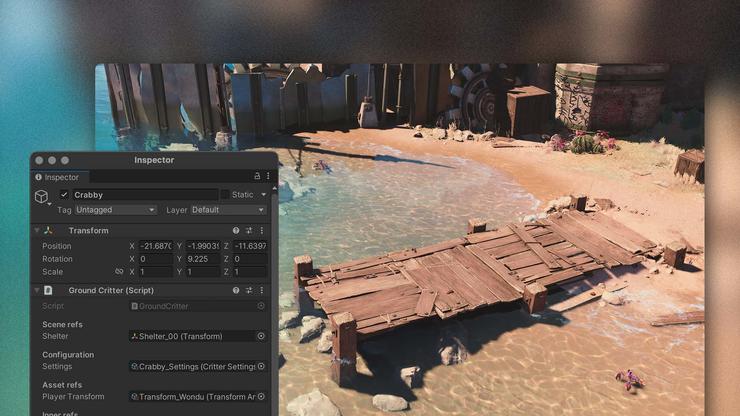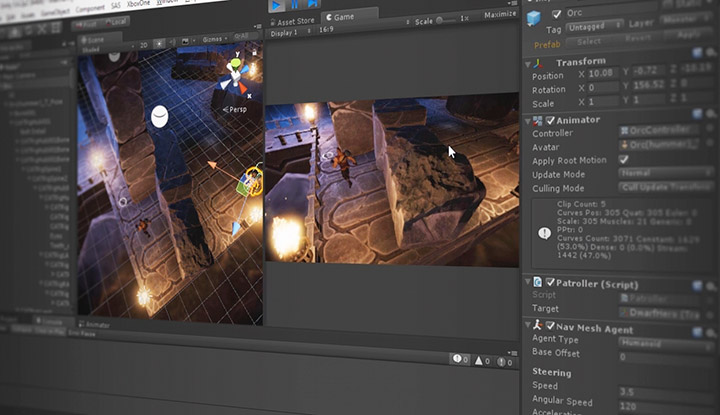
Unity - это кроссплатформенная среда разработки игр, позволяющая создавать интерактивные 2D- и 3D-игры. Эта платформа была создана компанией Unity Technologies в 2005 году и используется во многих отраслях, таких как архитектура, симуляционное проектирование, игровая индустрия, автомобилестроение и т.д. Она также используется в кинематографе и кинодизайне. Например, графика фильмов "Ready Player One" и "Big Hero 6" создавалась на движке Unity.
Unity имеет различные планы подписки для личного и профессионального использования. Unity Personal является бесплатным, а Unity Pro и Unity Plus - платными. В играх, разработанных на Unity, используются такие языки программирования, как C# и JavaScript. Платформа работает на базе фреймворка .NET Core.
Насколько легко разрабатывать игры на Unity?
Эта платформа проста в освоении и использовании. Даже новички могут легко разрабатывать игры на Unity, используя систему префабов, которая позволяет настраивать и хранить многократно используемые игровые объекты. В дальнейшем эти объекты можно повторно использовать в различных сценах и рендерах, что позволяет создавать такие объекты, как NPC и снаряды, на основе единого шаблона активов.
Unity обеспечивает рендеринг 3D- и 2D-графики высокой четкости и позволяет оформить проект по своему усмотрению. Кроме того, Unity разделяет всю игру на отдельные сцены, которые можно создавать независимо друг от друга.
Сцены похожи на уровни видеоигры. В соответствии с архитектурой Unity, игроку необходимо выполнить требования первой сцены, чтобы перейти к другой. Также можно работать над несколькими сценами одновременно.
Для создания пользовательских сборок можно использовать Unity Scripting API, чтобы взаимодействовать с движком Unity и использовать его для создания пользовательских функций в своем проекте. Движок Unity также включает в себя универсальное хранилище активов, которое можно использовать для приобретения шаблонов и эффектов частиц для своей игры.
Как начать разработку игры в Unity? Каковы этапы?
Для создания игр на Unity необходимо загрузить и установить на компьютер игровой движок. Открыв новый проект и импортировав все пакеты, можно приступать к созданию сценария игры.
Файл сцены содержит метаданные и информацию о ресурсах для текущей сцены. Вы можете изменять и фильтровать сцены в соответствии с вашими требованиями. Разработчики могут добавлять элементы в сцены, выбирая объекты из папки asset и перетаскивая их на открытую сцену. Редактировать объекты можно двойным щелчком на файле с кодом, чтобы открыть его в кроссплатформенном редакторе Unity - MonoDevelop. Однако изменения можно вносить только в интерфейсе Unity, а не в файловой системе.
На вкладке "Игра" можно проверить технические аспекты игры, такие как частота кадров, разрешение, ползунки масштабирования. После внесения изменений можно использовать игровой режим Unity для их тестирования на фоне. Вкладка "Сцена" позволяет вносить изменения в игру в реальном времени. Также можно установить аудиопрослушиватели для включения звуковых эффектов\/изменений в сцены.

Актуальна ли Unity на современном рынке?
Unity - один из ведущих мировых движков для разработки игр. В 2023 году количество людей, использующих Unity, выросло на 93%.
Причина популярности Unity двояка. Во-первых, Unity позволяет разработчикам быстро создавать и тестировать свои сборки с помощью IDE. С его помощью можно создавать анимационные эффекты и 3D\/2D-визуализацию для своей игры. Кроме того, с его помощью можно переносить опыт на аппаратное обеспечение более низкого уровня, что позволяет легко создавать сборки для таких устройств, как мобильные телефоны и планшеты.
Во-вторых, Unity имеет практичный инструментарий пользовательского интерфейса (хранилище активов), позволяющий быстро добавлять элементы в сцены без кодирования. Разработчики могут легко добавлять в свои сборки такие компоненты, как 3D-модели, аудиоэффекты, плагины, анимационные файлы и пользовательские иллюстрации. Кроме того, можно загружать свои творения в хранилище активов и делиться ими с сообществом.
Unity позволяет разработчикам создавать мультиплатформенные игры, способные работать на PlayStation, Windows, Xbox, Android и iOS. Современная система расширений редактора также позволяет создавать и визуализировать AR\/VR-сцены. Кроме того, вы можете тестировать свои сцены в реальном времени и компоновать компоненты (например, карты, эффекты и игровые объекты) прямо на ходу.
Unity также имеет очень полезное онлайн-сообщество, которое можно использовать для решения возникающих вопросов. Кроме того, на сайте Unity можно найти множество пользовательских документов для начинающих.
Есть ли крупные игры, разработанные с использованием Unity?
На движке Unity создано множество популярных игр, таких как:
- Among Us
- Pokémon Go
- Monument Valley 2
- Escape from Tarkov
Кроме того, такие AAA-игры, как Hearthstone и Wasteland 2, использовали движок Unity для своих сборок.
С какими проблемами сталкиваются начинающие разработчики при создании игр на Unity?
Unity - это ресурсоемкий игровой движок, который можно использовать для создания мобильных, консольных и AR\/VR-игр. На движке Unity можно также создавать 3D-игры. Однако прежде чем приступить к написанию сценария, необходимо учесть несколько моментов.
Прежде чем приступить к созданию игры, необходимо тщательно изучить требования к ней. Необходимо убедиться в том, что выбранный игровой движок может помочь выполнить поставленные требования. В противном случае есть вероятность, что вы застрянете и придется начинать все с нуля.
Перед созданием окончательной сборки необходимо проверить оптимизацию разработки модели. Это включает в себя настройку масштабных коэффициентов, процессов пакетирования и понимание зависимостей кода. Также необходимо уменьшить количество циклов обновления и вызовов отрисовки в сборке, поскольку они могут вызывать накладные расходы при финальном рендеринге. Для избавления от ненужных выделений памяти и повышения скорости работы можно использовать сборщики мусора.
Поскольку все изменения игровых объектов в сценах необходимо просчитывать индивидуально, важно не испортить физику сцены. Например, если вы работаете со сценой с коллайдером, в которой в фоновом режиме происходит множество столкновений, используйте для изменений функцию FixedUpdate, а не Update. Это обеспечит одновременное влияние изменений на все компоненты сцены.
Заключение
Unity - это замечательный механизм разработки, позволяющий инженерам создавать высококачественные интерактивные игры. Многие компании малого и среднего бизнеса используют движок Unity для создания прототипов и полномасштабной разработки игр. Многие популярные игры, такие как Pokémon Go и Monument Valley 2, были созданы на этом движке.
Несмотря на то что Unity имеет ряд ограничений, он предлагает множество преимуществ разработки, которые полностью перекрывают его недостатки. Он прост в использовании, поддерживает множество платформ и позволяет создавать высококлассные многопользовательские игры. Кроме того, в нем есть инструмент инспектора, позволяющий быстро редактировать сцены в режиме реального времени.
Unity - идеальный движок для начинающих программистов, желающих начать разработку игр. Он упрощает процесс разработки и позволяет создавать универсальные игры, не прибегая к кодированию. Кроме того, многие крупные студии используют Unity для своих сборок, а это значит, что приобретенные навыки пригодятся вам в будущем, будь то инди или AAA.